The Mighty EventBus: Or How I Stopped Wiring My Code Like a Madman
The Joy of Loose Coupling
One of the biggest joys of game development is seeing your systems work together like a finely tuned orchestra.
One of the biggest pains of game development is trying to make them communicate without turning your code into spaghetti. 🍝
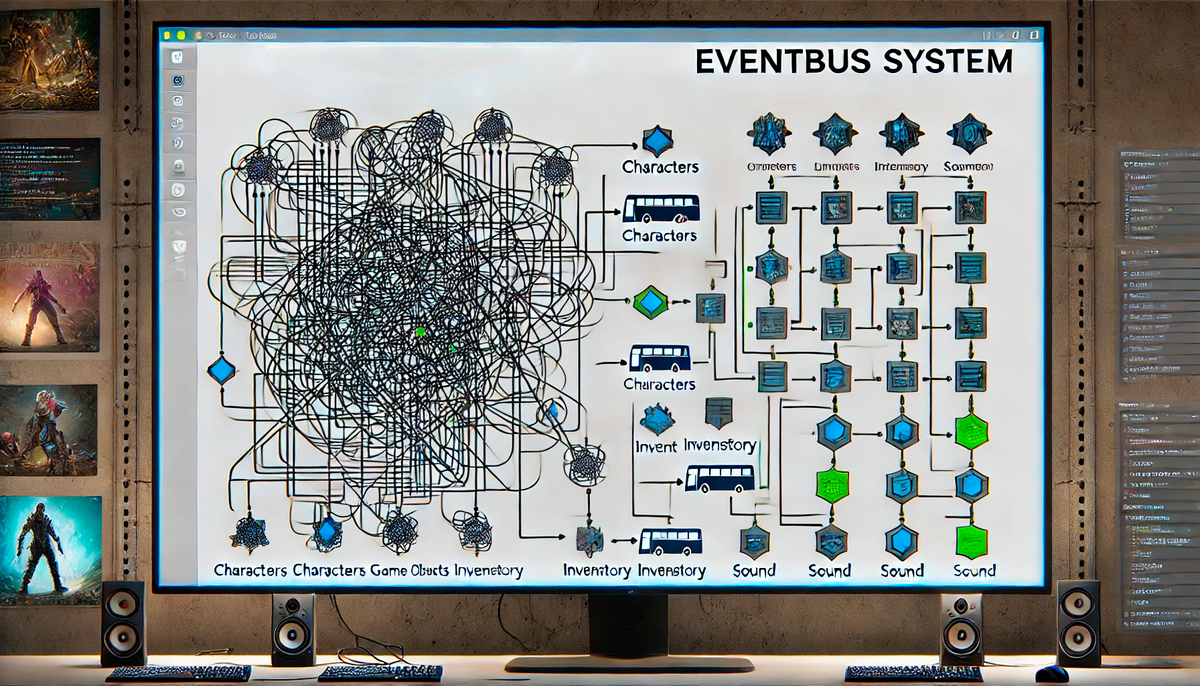
That’s where EventBus comes in a magical middleman that lets my game objects talk to each other without hard dependencies!
The Problem – A World Without an EventBus
Imagine you have a UI manager that needs to update when the player collects resources.
- You could make the UI script reference the inventory system directly… but now it’s tightly coupled!
- What if I later change how the inventory works? Time to rewrite everything.
- What if I want multiple systems (audio, achievements, AI) to react to resource collection? Do I add a reference for each one? 🤯
This approach quickly turns into callback hell and a maintenance nightmare.
The Solution – Enter the EventBus
Instead of direct dependencies, the EventBus acts as a broadcaster:
- Components "subscribe" to events they care about (e.g., UI listens for inventory changes).
- Other components "publish" events when something happens (e.g., the player picks up an item).
- The EventBus delivers the message without anyone needing to know who else is listening.
It’s like a radio station—the broadcaster doesn’t care who’s listening, and listeners don’t care who’s broadcasting. Pure, beautiful, decoupled communication.
How It Works – The Code
Here’s my EventBus implementation:
using System;
using System.Collections.Generic;

namespace Valcriss.Scripts.Tools
{
    public static class EventBus
    {
        private static readonly Dictionary<Type, List<Delegate>> EventDictionary = new();

        public static void Subscribe<T>(Action<T> listener)
        {
            Type eventType = typeof(T);
            if (!EventDictionary.ContainsKey(eventType))
            {
                EventDictionary[eventType] = new List<Delegate>();
            }
            EventDictionary[eventType].Add(listener);
        }

        public static void Unsubscribe<T>(Action<T> listener)
        {
            Type eventType = typeof(T);
            if (EventDictionary.TryGetValue(eventType, out List<Delegate> value))
            {
                value.Remove(listener);
            }
        }

        public static void Publish<T>(T eventToPublish)
        {
            Type eventType = typeof(T);
            if (EventDictionary.TryGetValue(eventType, out List<Delegate> value))
            {
                foreach (Delegate listener in value)
                {
                    (listener as Action<T>)?.Invoke(eventToPublish);
                }
            }
        }
    }
}
How to Use It
1. Subscribe to an event
EventBus.Subscribe<ResourceCollected>(OnResourceCollected);
2. Publish an event
EventBus.Publish(new ResourceCollected { ResourceType = "Water", Amount = 10 });
3. Handle the event
private void OnResourceCollected(ResourceCollected evt)
{
    Debug.Log($"Player collected {evt.Amount} of {evt.ResourceType}");
}
Why Use It?
Loose Coupling – Systems don’t need to reference each other directly.
More Flexible Code – Add or remove subscribers without modifying the event source.
Easier Debugging – Events are centrally managed, making behavior easier to track.
Final Thought – EventBus Saves My Sanity
Without an EventBus, my game would be a tangled web of dependencies. Now, systems communicate effortlessly, and I can focus on more important things like making sure my survivors don’t starve in my post-apocalyptic bunker. 🏚️
L’EventBus : Mon Sauveur Contre le Code Spaghetti
Le Problème – Un Monde Sans EventBus
Faire communiquer les systèmes d’un jeu peut vite devenir un cauchemar. Imaginons que l’interface utilisateur doive se mettre à jour quand le joueur collecte des ressources :
- On pourrait faire un appel direct à l’inventaire… mais bonjour le couplage fort !
- Et si je modifie le système d’inventaire plus tard ? Tout casse.
- Et si plusieurs systèmes (UI, son, succès) doivent réagir ? J’ajoute une référence pour chacun ?! 🤯
Sans structure, ça devient vite une horreur de callbacks imbriqués et de dépendances en cascade.
La Solution – L’EventBus à la rescousse !
L’EventBus est une station radio pour mon jeu :
- Les objets "s’abonnent" aux événements qui les intéressent.
- D’autres objets "publient" un événement quand quelque chose se passe.
- L’EventBus transmet le message sans que l’expéditeur et le récepteur aient besoin de se connaître.
Plus besoin de coupler directement les systèmes, tout est découplé et propre.
Le Code – Mon EventBus
using System;
using System.Collections.Generic;

namespace Valcriss.Scripts.Tools
{
    public static class EventBus
    {
        private static readonly Dictionary<Type, List<Delegate>> EventDictionary = new();

        public static void Subscribe<T>(Action<T> listener)
        {
            Type eventType = typeof(T);
            if (!EventDictionary.ContainsKey(eventType))
            {
                EventDictionary[eventType] = new List<Delegate>();
            }
            EventDictionary[eventType].Add(listener);
        }

        public static void Unsubscribe<T>(Action<T> listener)
        {
            Type eventType = typeof(T);
            if (EventDictionary.TryGetValue(eventType, out List<Delegate> value))
            {
                value.Remove(listener);
            }
        }

        public static void Publish<T>(T eventToPublish)
        {
            Type eventType = typeof(T);
            if (EventDictionary.TryGetValue(eventType, out List<Delegate> value))
            {
                foreach (Delegate listener in value)
                {
                    (listener as Action<T>)?.Invoke(eventToPublish);
                }
            }
        }
    }
}
Comment l’utiliser ?
1. Abonner une fonction à un événement
EventBus.Subscribe<ResourceCollected>(OnResourceCollected);
2. Publier un événement
EventBus.Publish(new ResourceCollected { ResourceType = "Water", Amount = 10 });
3. Gérer l’événement
private void OnResourceCollected(ResourceCollected evt)
{
    Debug.Log($"Player collected {evt.Amount} of {evt.ResourceType}");
}
Pourquoi c’est génial ?
Code découplé – Aucun système ne dépend directement des autres.
Extensible – Ajouter un nouvel abonné ne change rien au reste du code.
Facile à debugger – Tout est centralisé et traçable.
Conclusion – Vive l’EventBus !
Grâce à cet outil magique, mon jeu ne ressemble plus à une boîte de spaghettis. Tout communique proprement, et moi, je peux me concentrer sur la survie de mes pauvres réfugiés au lieu de déboguer un monstre de dépendances. 🏚️🔥